
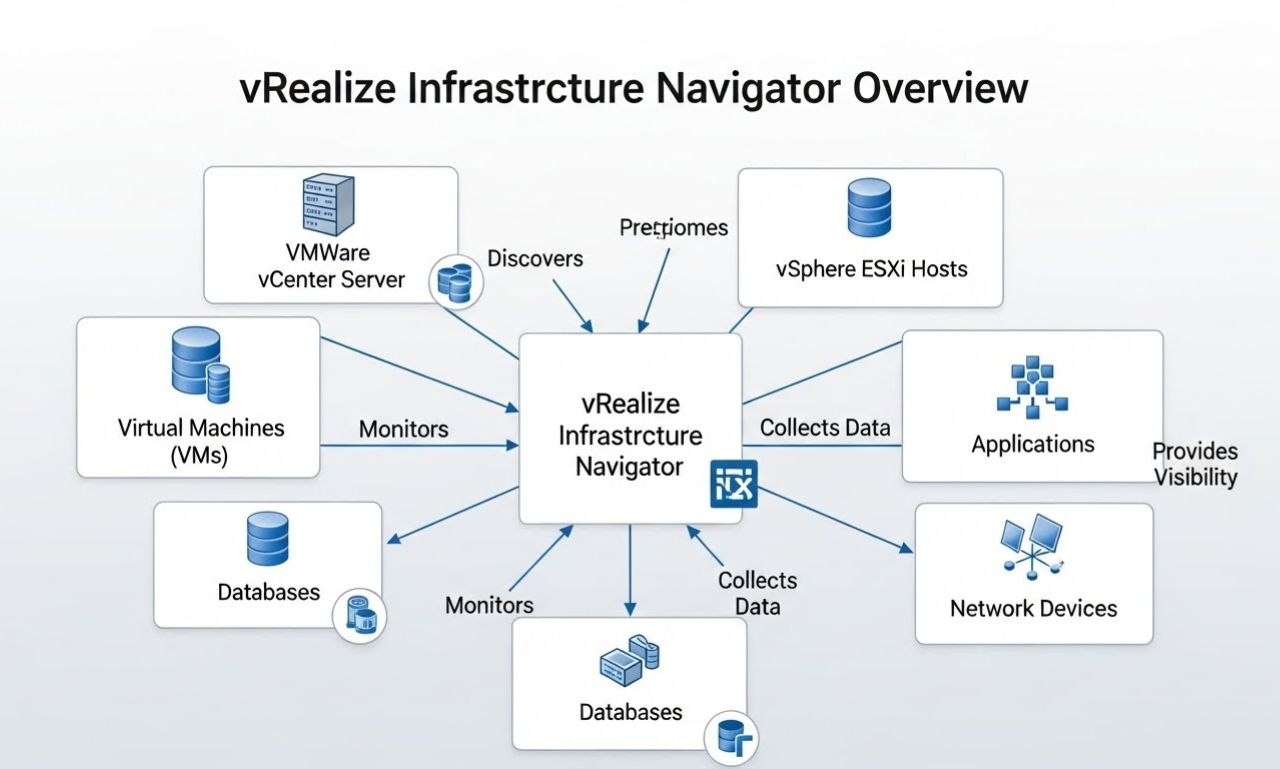
vRealize Infrastructure Navigator (VIN) is a software solution by VMware designed to bring visibility and clarity into virtualized environments. In complex IT settings where multiple virtual machines (VMs), applications, databases, and services interact. Understanding which part depends on what becomes critical for stability, migration, and change management. VIN achieves this by automatically discovering applications running inside VMs and mapping their interdependencies. Giving administrators a live, holistic view of their infrastructure.
As enterprises increasingly adopt virtualization, hybrid clouds, and dynamic workloads, tools like VIN play a central role in avoiding unintended disruptions, planning migrations, and enforcing compliance. However, given the evolving landscape, it’s important to understand both its strengths and limitations — and how VIN fits into modern VMware‑based infrastructure strategy.
Key Features of vRealize Infrastructure Navigator
VIN offers a suite of powerful features tailored for VMware‑based virtual environments. Below are its most important capabilities:
Automated Application Discovery
VIN can automatically scan all VMs managed by vCenter Server and detect what applications and services are running inside them — whether it’s a database server, web server, middleware, or custom in‑house software. This happens without manual intervention or configuration, drastically reducing time and human error compared to manual inventory efforts.
Real-Time Dependency Mapping
Once applications and services are detected, VIN builds a live topology map showing how these components communicate — which VM talks to which database, which web server serves which clients, etc. It captures network communications, protocols, ports, and service relationships. Administrators can then visualize dependencies in graphical topology diagrams, enabling clear insight into the interconnections within the virtual infrastructure.
Seamless VMware Integration
VIN integrates directly into the vSphere Web Client — the central administrative console for VMware environments — making it easily accessible without introducing separate management tools. It also integrates with other components of the VMware ecosystem, including vRealize Operations Manager (vROps), vRealize Automation (vRA), and network‑centric tools such as VMware NSX. This integration enables administrators to correlate performance data, dependencies, and automation workflows in a unified manner.
Change Impact and Capacity Planning
Before making changes — like migrating VMs, patching, or decommissioning a server — VIN allows admins to assess the potential impact by showing which services or applications depend on the target components. This change‑impact analysis reduces the risk of unintended disruptions. In addition, by visualizing resource usage and interdependencies, it supports capacity planning, resource optimization, and migration grouping (i.e., which VMs should be migrated together to preserve application integrity).
Improved Troubleshooting & Root Cause Analysis
When performance issues or outages occur. VIN’s real‑time dependency maps help administrators quickly trace which application or service may be at fault. This reduces mean time to repair (MTTR) and minimizes downtime by enabling precise identification of affected components instead of relying on guesswork.
Support for Security, Compliance & Migration
By revealing hidden dependencies and communication paths. VIN enables better security posture — for example, defining precise firewall or micro‑segmentation rules in conjunction with NSX. It also helps in compliance reporting and audit trails by maintaining documented mappings of how applications and data stores communicate. Additionally, when planning cloud migrations or data center consolidation. VIN helps identify which workloads must be moved together to preserve functionality.
How vRealize Infrastructure Navigator Works
To deliver the capabilities above, VIN uses a combination of automated discovery, network analysis, and visualization. Here’s a breakdown of its workflow:
-
Virtual Appliance Deployment
VIN is deployed as a virtual appliance (an OVA/OVA-based VM) inside your VMware environment. Once the appliance is online and connected to vCenter Server, it has visibility into all VMs managed by that vCenter. -
Agentless Discovery & Service Detection
Using built-in VMware Tools or other introspection means, VIN collects metadata about each VM — operating system, running processes/services, open ports, network flows, etc. Importantly, this is done without requiring additional agents on every VM, which reduces management overhead and compatibility issues. -
Dependency Correlation & Mapping
VIN analyzes the collected data to infer which applications or services communicate with each other — which VMs are clients, which are servers, which databases are accessed by which application, and so on. It records network flows, port/protocol usage, directionality, and dependencies. -
Visualization & Reporting
The dependency data is visualized in topology maps inside the vSphere Web Client (or vROps dashboard). Administrators can drill down, view relationships, export reports, and plan migrations or changes while referencing actual dependency data rather than assumptions. -
Ongoing Monitoring & Updates
As the environment changes — VMs are added, removed, moved, updated — VIN continuously (or on a scheduled interval) re‑scans and updates the dependency maps, keeping the infrastructure view current.
Benefits of Using vRealize Infrastructure Navigator
Using VIN delivers several tangible advantages in virtualized and VMware-centric environments:
-
Complete infrastructure visibility: VIN reveals what’s really running inside each VM and how everything interconnects — replacing outdated spreadsheets or manual documentation.
-
Reduced downtime risk: By knowing dependencies before changes, migrations, or maintenance, teams avoid unintended outages or broken application chains.
-
Faster troubleshooting: Dependency maps help pinpoint root causes quickly during performance issues or failures.
-
Optimized resource allocation & planning: Capacity planning, workload consolidation, and migration grouping become more accurate and safe.
-
Better security and compliance posture: Visibility into communication paths allows precise micro‑segmentation, audits, and compliance enforcement.
-
Smoother migrations and modernization: For cloud migration, data center consolidation, or hybrid‑cloud transitions, VIN helps ensure that interdependent workloads stay together.
Limitations and Lifecycle Considerations
Despite its strengths, VIN also has notable limitations — particularly in modern IT environments:
-
VMware‑only scope: VIN works only within VMware vSphere environments. It does not natively support physical servers, container-based workloads, or modern cloud-native services.
-
Dependency on VMware Tools / Guest introspection: If VMware Tools are missing or outdated, VIN may fail to detect applications or misidentify dependencies.
-
Not always up-to-date for newer VMware versions: VIN was more relevant to earlier vSphere generations; as of recent years, support and updates for VIN have diminished, raising concerns about compatibility with modern vSphere or cloud‑oriented infrastructures.
-
Limited support for encrypted or custom protocols: Services using non‑standard ports, proprietary communication, or encrypted traffic might evade detection or mapping, reducing accuracy.
-
No advanced analytics or cross-platform support: VIN focuses on dependency mapping and visualization, but lacks advanced analytics, predictive insights, or integration with non‑VMware environments.
Given these limitations, many organizations now consider newer tools for hybrid cloud, container, or multi-platform visibility — though for legacy VMware‑centric environments, VIN can still provide significant value.
Use Cases and Ideal Scenarios for vRealize Infrastructure Navigator
VIN works best in certain types of IT environments and use cases. Some of the most fitting scenarios include:
-
Legacy VMware‑centric data centers — If your infrastructure is built primarily on vSphere and uses VMs (not containers or cloud‑native services), VIN offers complete internal visibility.
-
Data center consolidation or migration to cloud/on‑prem clusters — Before migrating workloads, VIN helps map dependencies so you move related VMs together, avoiding application disruption.
-
Change management, patching, maintenance windows — When patching or upgrading servers, VIN ensures you know what services will be impacted, minimizing downtime and surprises.
-
Disaster recovery (DR) and business continuity planning — VIN can assist in defining correct grouping and recovery order of interdependent services for DR plans.
-
Security audits and compliance requirements — For organizations needing to show documentation of communication paths, access flows, or enforce micro‑segmentation, VIN provides clear dependency graphs.
-
Resource and capacity optimization — By visualizing service usage and dependencies, teams can identify underutilized VMs, consolidate workloads, or optimize resource allocations.
What’s Next: VIN in 2025 and Beyond
While VIN provided valuable capabilities, the IT landscape has shifted significantly in recent years. The rise of cloud, containers, hybrid workloads, microservices, and multi‑platform architectures has made legacy VM‑only tools less comprehensive. Support for VIN has diminished, and newer tools from VMware and other vendors offer broader. More flexible visibility across hybrid and multi‑cloud environments.
For many organizations, especially those evolving beyond pure VMware virtualization, it may make sense to explore modern alternatives and successors:
-
vRealize Network Insight (vRNI) — focuses on network‑level monitoring, flow analysis, and security insights, suited for hybrid/cloud settings.
-
Other observability or APM tools that support cloud, containers, microservices, and hybrid deployments.
-
For legacy or on‑prem VMware-only shops — carefully evaluate whether VIN still meets requirements, and whether its limited scope is acceptable for future growth.
In short: VIN remains a useful, lightweight tool for application-aware VM infrastructure visibility. But its relevance depends strongly on how modern and diverse your environment is. For many, it may be part of a larger toolset, rather than the sole solution.
Conclusion
vRealize Infrastructure Navigator delivered something many virtualization environments lacked. A clear, automatic, real‑time view into what applications run where, how they interact, and which dependencies exist. With automated application discovery, dependency mapping, integration into VMware tools. And capacity to support migrations, compliance, security, and change management, VIN addressed fundamental challenges in VM‑based infrastructure management.